
How to Solve Edge Banding Machine Edge Ripple Defect | M-shineTech
Time : Sep 18, 2026

The high-speed rotating fine trimming cutter of the edge banding machine naturally leaves circular knife-tooth ripples. Normally, the subsequent scraping unit removes these knife marks. If scraping is incomplete, obvious waves will appear. Besides, unstable board feeding, defective pressure rollers, worn cutting tools and poor-quality edge banding tape can also cause ripples. M-shineTech’s Automatic edge bander and PUR edge bander feature rigid frames, which greatly reduce vibration ripples during high-volume mass production.
1. Most ripples originate from the trimming and scraping system
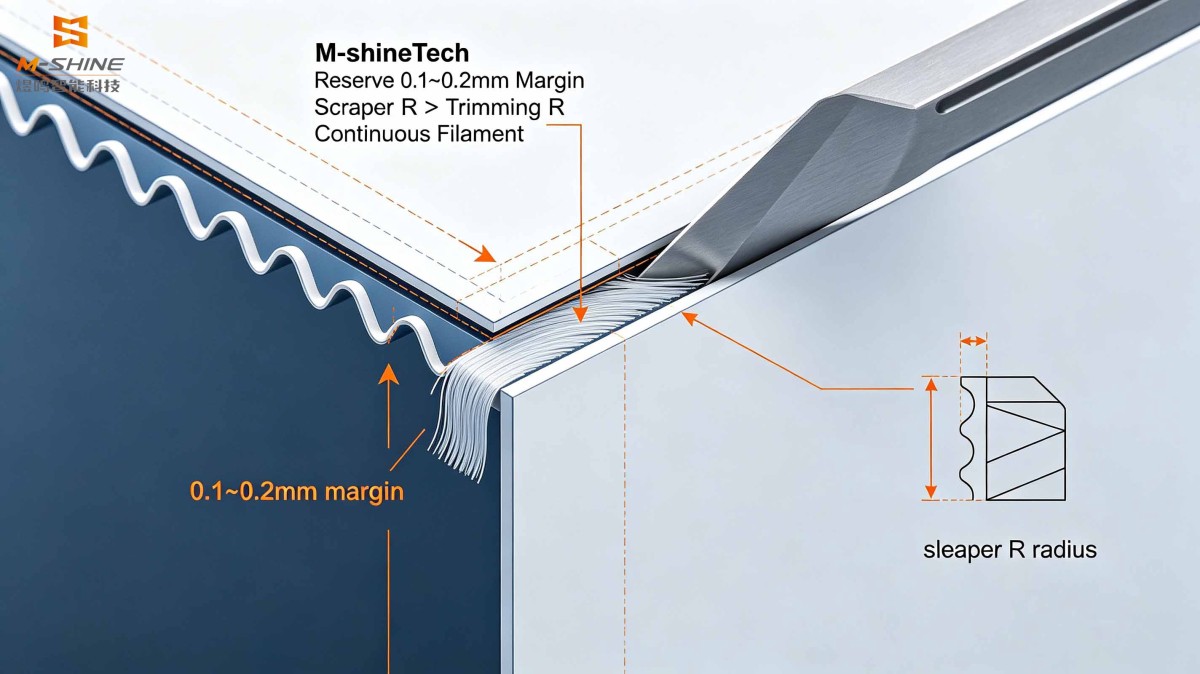
- No margin reserved after fine trimming, the scraper cannot work properlyCause: Too much material is removed in fine trimming, leaving no surplus material on the edge banding tape for the scraper. The knife-tooth marks remain and directly form ripples. ✅Solution: Reserve a 0.1~0.2mm margin on the edge of the edge banding tape after fine trimming. A thin and flexible continuous filament should be formed during scraping. Brittle filaments that break easily indicate insufficient reserved margin.
- Mismatched radii between fine trimming cutter and scraping cutterCause: If the R radius of the fine trimming cutter is larger than that of the scraper, the scraper cannot fully fit the chamfer arc, leaving residual knife marks on the curved surface. ✅Solution: Adjust the dial for the scraper radius. Make the scraper’s R radius slightly larger than that of the fine trimming cutter to ensure full coverage of the entire chamfer surface.
- Insufficient floating scraping pressure, loose profile follower wheel, excessive bearing clearanceCause: Low spring pressure of the scraping assembly, wobbling profile follower wheel and worn bearings cause the scraper to jump, resulting in periodic ripples. ✅Solution: Increase the spring pressure of the scraping unit; inspect and replace bearings with excessive clearance; fasten the tool holder to eliminate shaking.
- Dull or chipped cutting tools, loose tool clampingCause: Worn or chipped fine trimming / scraping blades, or loosely clamped tool shanks trigger spindle vibration during high-speed cutting and create ripples. ✅Solution: Sharpen or replace cutting tools; lock the tool seat tightly and check spindle runout.
2. Problems of Board Feeding, Pressure Rollers and Conveying System of Edge banding machine
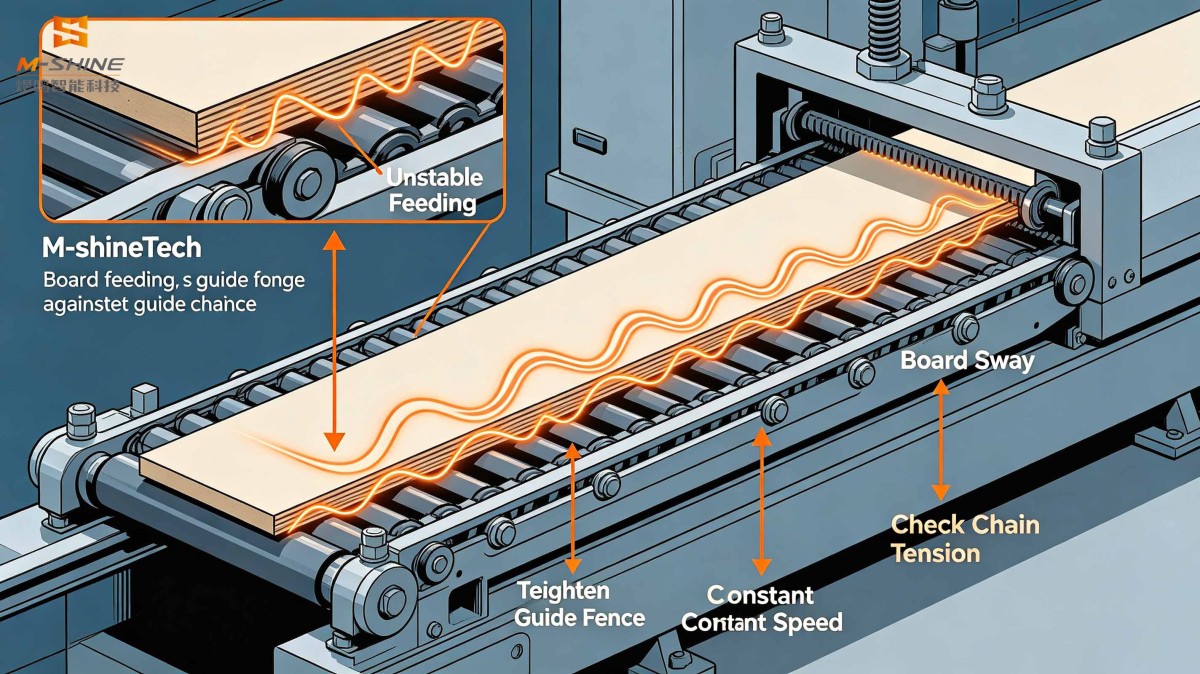
- Unstable feeding speed and board shakingCause: Loose feeding fence, slipping conveyor chain and boards not closely against the guide fence. The board sways slightly left and right during conveying, which creates waves on the edge banding tape. ✅Solution: Tighten the feeding fence to keep boards close to the guide; check the chain tension; maintain a constant feeding speed for boards of the same batch and avoid speed fluctuation.
- Pressure rollers with adhesive residue, abrasion or uneven pressureCause: Solidified hot melt adhesive lumps on roller surface, uneven rubber due to aging. Fluctuating pressure lifts the edge banding tape by adhesive particles and forms ripples. ✅Solution: Clean residual adhesive on pressure rollers every shift; replace severely worn rollers; ensure balanced pressure of all pressure rollers and avoid excessive pressure on a single point.
3. Factors Related to Edge Banding Tape of Edge Banding Machine
- Edge banding tape with large thickness tolerance or soft material tends to deform and form ripples when passing through pressure rollers and trimming units.
- Excessive tension or thermal shrinkage of edge banding tape causes undulation after being bonded to the board. ✅Solution: Switch to edge banding tape with stable thickness tolerance; reduce the tension of the unwinding unit; pre-warm edge banding tape in advance for low-temperature workshop environments.
4. Simple Troubleshooting Sequence
- Run a test board passing fine trimming only and bypass the scraping unit to check for ripples:
- If ripples appear: The ripples are generated by the fine trimming cutter → Focus on adjusting scraping allowance, radius matching and scraping pressure.
- No ripples after fine trimming but ripples emerge after scraping: Scraper jumping, excessive pressure or chipped scraper blade.
- Inspection items: Check whether the profile follower wheel wobbles, whether pressure rollers have adhesive residue, and the sharpness of cutting tools.
- Verification: Reserve a 0.1–0.2mm allowance for fine trimming; make the scraper R radius slightly larger than the fine trimming cutter R radius to produce thin and continuous scraped filaments.
5. Frequently Asked Questions
- For machines with both rough trimming and fine trimming: Rough trimming removes most of the allowance, while fine trimming only performs precision finishing. Avoid heavy one-time cutting loads on the fine trimming cutter, as it easily causes vibration and ripples. M-shineTech Automatic edge bander comes standard with a dual trimming structure for superior stability during high-speed operation.
- For high-gloss door panels: Polishing is required after scraping. Dirty polishing wheels will amplify the visual effect of ripples. Remember to clean the polishing cloth wheels regularly.
- Resonance: Loose machine frame or tool holder may trigger periodic wave patterns under high-speed rotation. Tighten the tool holder screws. For PUR edge bander, frame rigidity is especially critical under high-temperature PUR processing to reduce resonance-induced ripples.
Previous page:Already the first
Next page:Already the last
Related Posts
Online Message
JINAN M-SHINE